


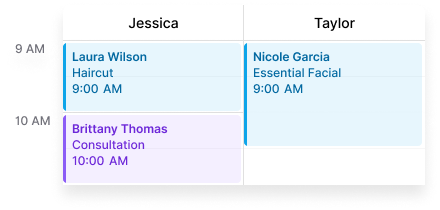
Scheduling is the operational core of any hair salon. When it works, your stylists are fully booked and clients show up on time. When it doesn’t, you’re double-booking chairs, fielding calls about slot availability, or staring at calendar gaps that should have been filled — especially painful when a no-show leaves a two-hour color block empty. The scheduling software you choose determines which of those experiences is your daily reality.
This guide focuses specifically on scheduling capability — real-time availability, per-stylist management, service duration accuracy, and how well the software handles the complexity that hair salons actually deal with.
What makes hair salon scheduling different
Hair salons are more operationally complex than a quick-service business in a few specific ways:
- Per-stylist booking — clients often book with a specific stylist, not just “anyone available”
- Variable service durations — a root touch-up takes 90 minutes; a men’s cut takes 30; balayage can block a chair for three hours
- Processing overlap — color services have active and processing time that affects how many clients a stylist can handle
- Walk-ins alongside online bookings — front desk needs a shared calendar view to slot walk-ins without conflicts
- High chair-time value — a scheduling mistake on a color appointment often means a lost $100–$200 block
Good scheduling software handles all of this without requiring manual workarounds.
1. DaySpark

DaySpark’s scheduling engine is built around real-time availability across a full stylist team. Services are configured with duration, assigned to specific stylists, and respect individual availability rules, so clients only ever see slots that are actually open.
Scheduling-specific strengths:
- Stylist-specific service assignment — clients can choose a specific stylist or book the next available
- Real-time calendar sync across all team members with a shared front-desk view
- Configurable service durations for cuts, color, styling, and add-ons
- Deposit and card-on-file collected at booking on all plans, which reduces no-shows on long appointments
- Automated email reminders on all plans; SMS reminders available on Growth and Professional plans (separate $5/mo SMS add-on required, US and Canada)
Best for: Salons with 1–10 stylists that want scheduling, client notes, payments, and reminders in a single platform. The Essential plan ($59/mo) covers small teams; the Growth plan ($99/mo) adds SMS reminders, multi-location, and up to 10 staff per location.
2. Boulevard
Boulevard’s smart scheduling engine is one of its differentiating features. It looks at the full schedule when inserting a new appointment and can suggest slots that minimize gaps and maximize stylist utilization — valuable for high-volume salons.
Scheduling-specific strengths:
- Intelligent slot suggestion to reduce dead time between appointments
- Strong multi-service and multi-stylist booking support
- Service and stylist-specific availability rules
- Client-facing booking with strong branding controls
Best for: Established, higher-volume salons willing to pay for a premium scheduling experience and advanced utilization optimization.
Limitation: Entry cost is high ($175–$400/month) and some scheduling features are gated to higher plans.
3. Vagaro
Vagaro offers solid multi-stylist scheduling for salons that want marketplace exposure alongside their own booking page. Stylists have individual calendars and availability, and services can be assigned to specific staff.
Scheduling-specific strengths:
- Multi-staff calendar with color-coding
- Service-to-stylist assignment
- Both marketplace and direct booking links
- Class/group scheduling alongside individual appointments
Best for: Salons that want to leverage the Vagaro consumer marketplace as a discovery channel alongside internal scheduling.
Limitation: The interface is dense. Getting a clean, branded booking experience requires more configuration than some competitors. Key features like advanced reminders require paid add-ons.
4. Fresha

Fresha’s booking flow is fast and clean, and the calendar interface is easy to navigate even for teams less comfortable with scheduling software.
Scheduling-specific strengths:
- Simple multi-stylist calendar
- Consumer-facing booking page with stylist selection included
- Clean mobile experience for clients
- Straightforward per-stylist availability setup
Best for: Small teams or solo operators that want a consumer marketplace alongside a clean scheduling tool.
Limitation: The commission on new client bookings adds up at salon volume. Complex service duration rules and processing-time logic are limited. Not designed for busy multi-chair salons with heavy walk-in traffic.
5. GlossGenius

GlossGenius has one of the cleanest mobile scheduling experiences for independent stylists. The calendar is intuitive and the booking page is attractive out of the box.
Scheduling-specific strengths:
- Simple, mobile-first calendar for solo stylists
- Clean client-facing booking with service selection
- Deposits and card-on-file at booking
- Fast setup — live in under an hour
Best for: Solo stylists and booth renters who need scheduling without team coordination complexity.
Limitation: Not built for multi-stylist salons with a shared front desk. No shared team calendar for coordinating walk-ins across chairs.
6. Square Appointments
Square Appointments handles online booking with staff and service selection, integrated with Square’s payment ecosystem.
Scheduling-specific strengths:
- Online booking with stylist and service selection
- Calendar sync across staff on paid plans
- Integrated checkout at the chair
- Free tier for solo operators
Best for: Small salons or solo stylists already using Square for payments who want basic scheduling without switching ecosystems.
Limitation: Team scheduling features are basic compared to purpose-built salon platforms. Service duration customization and reminder sequences are limited. Not ideal for salons with complex color menus and multi-chair coordination.
Scheduling feature comparison
| Platform | Multi-stylist | Per-stylist booking | Service duration control | Deposits at booking | Starting price |
|---|---|---|---|---|---|
| DaySpark | Yes | Yes | Yes | Yes | $59/mo includes 3 staff on Essential plan |
| Boulevard | Yes | Yes | Yes | Yes | ~$175+ |
| Vagaro | Yes | Yes | Yes | Yes | ~$30/mo + $10/staff/mo |
| Fresha | Yes | Yes | Yes | Yes | ~$15/staff/mo + 20% commission on marketplace bookings |
| GlossGenius | Solo/small team | Yes | Yes | Yes | $28/mo for solo plan |
| Square Appointments | Yes | Yes | Limited | Yes | Free (solo) / ~$29/mo (teams) |
Scheduling software for your salon size
Solo stylist or booth renter: DaySpark Essential ($59/mo) or GlossGenius. Simple setup, clean client experience, everything you need without paying for a team-size platform.
3–5 stylists, growing salon: DaySpark Growth ($99/mo). SMS reminders, multi-location when you’re ready, and up to 10 staff per location at a price that makes sense for a growing team.
5+ stylists, high volume: Boulevard or Vagaro. Boulevard for utilization optimization and brand control; Vagaro if marketplace discovery is part of your client acquisition strategy.
Scheduling software is one of the few tools your front desk and stylists interact with every single hour of the working day. It’s worth running a real trial with your actual service menu, stylist schedules, and booking scenarios before committing.
Further reading: Best hair salon software guide · DaySpark vs Fresha · Is Fresha worth it? · Hair salon no-show playbook · How to add online booking to your website
DaySpark offers a 14-day free trial with no credit card required.